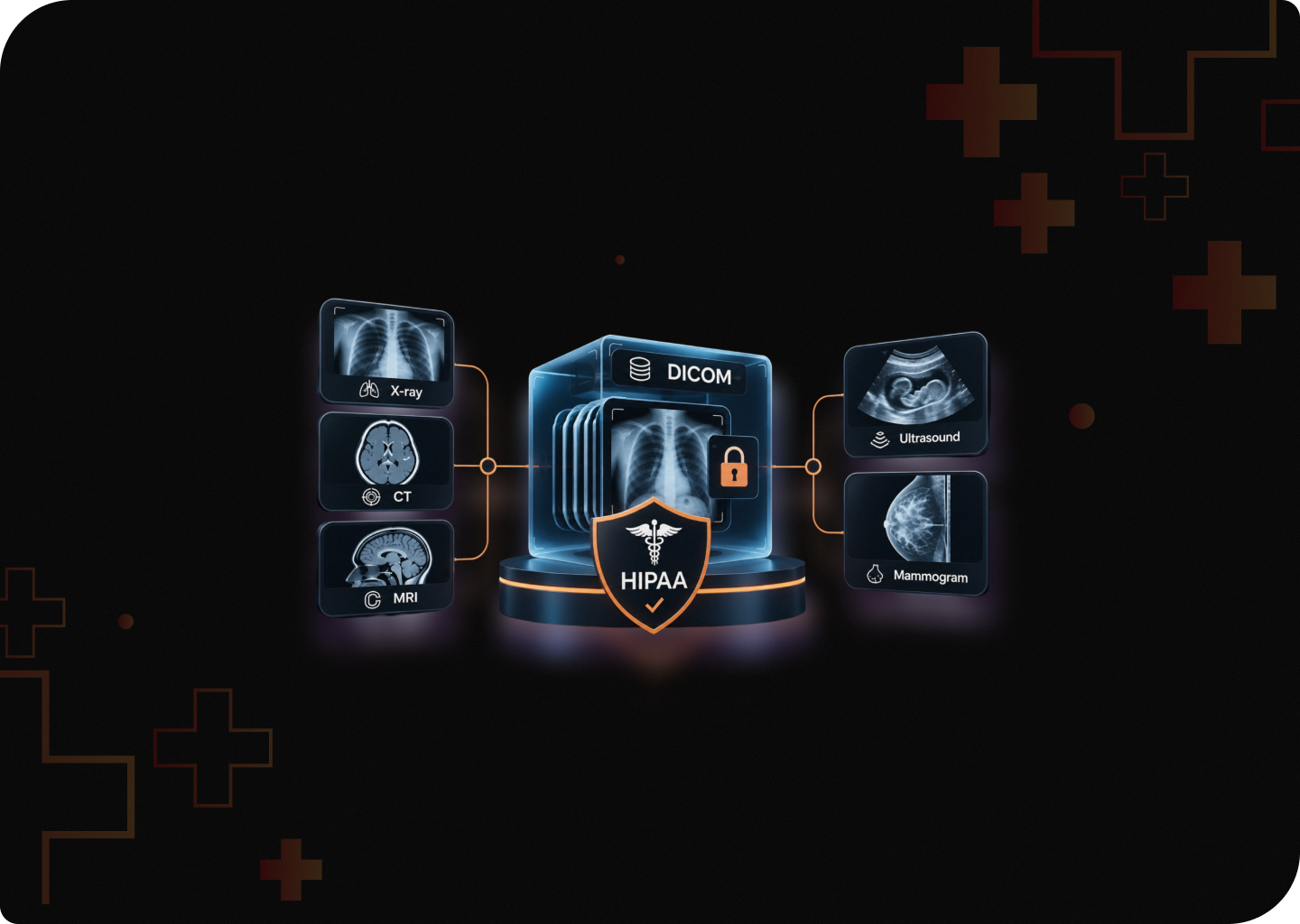
If you’re building a medical imaging product, where does a patient’s data actually go after a scan?
It doesn’t necessarily stay with the scanner. DICOM files can contain patient identifiers and move between PACS servers, cloud platforms, third-party systems, and AI applications.
That’s a lot of ground to cover from a security standpoint.
In 2025, Northeast Radiology faced a $350,000 OCR settlement following a breach involving radiology images stored on its PACS server. The incident potentially affected nearly 300,000 patients.
HIPAA is obviously part of the picture. But depending on what your product does and how it’s used, SOC 2, FDA cybersecurity requirements and AI governance could also be relevant.
Not every requirement applies to every medical imaging startup, though. So, let’s look at where each one fits.
What Are Medical Imaging Software Startups, and Which Healthcare Compliances Apply?
Medical imaging software startups build tools that capture, store, share, analyze or display medical images. Think X-rays, CT, MRI, ultrasound and mammograms.
If your product handles identifiable images for a hospital, clinic or imaging center, HIPAA applies. But you will also need SOC 2 and an AI governance plan to prove stricter controls through their governance, when the audit comes.
What Counts as Medical Imaging Software?
- PACS and cloud PACS: Archive and share DICOM studies across a care team.
- DICOM viewers: Let radiologists, doctors or patients open and review images.
- Imaging AI and CAD tools: Flag, triage, measure or draft findings from scans.
- Teleradiology platforms: Route studies to remote radiologists for reads.
- Image sharing and patient portals: Send studies between facilities or to patients.
- Annotation platforms: Label images to train AI models.
- Radiology Information Systems (RIS): Run scheduling, orders, and reporting.
HIPAA is where every imaging startup starts. So, let’s begin there.
HIPAA Compliance Requirements for Medical Imaging Startups
HIPAA asks three things of you. Protect patient images, limit who sees them, and report breaches on time. Imaging makes each of these harder, because the patient data travels inside every file.
Are You a Business Associate or a Covered Entity?
Your HIPAA role depends on what you do with the images.
You sell to hospitals or imaging centers and handle identifiable images
Business associate
Security Rule, Breach Notification Rule, and a BAA with every customer and subprocessor.
You provide and bill for clinical reads, like many teleradiology groups
Often a covered entity
All HIPAA rules apply to you directly
You only receive properly de– identified data
Outside HIPAA
No BAA needed, but your de– identification must hold up
You run a consumer app patients use on their own
Usually outside HIPAA
FTC Health Breach Notification Rule and state privacy laws
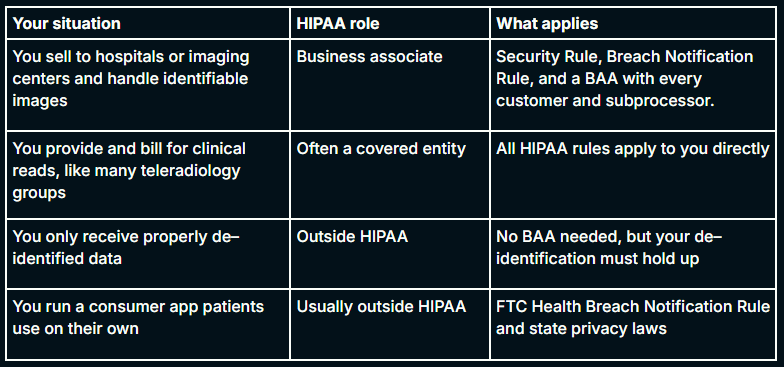
Most imaging startups sit in the first row. Hospitals won’t send a single study until you sign a BAA.
But, in California, the CMIA can also reach patient facing viewers and portals. A May 2026 ruling said exposure alone can count as a breach.
PHI Lives Inside the DICOM File
In most health software, patient data sits in a database you control. In imaging, it rides along with every image.
- The DICOM header stores name, patient ID, birth date and accession number.
- Free text fields and private vendor tags often hold more identifiers.
- Ultrasound, mammography, and nuclear medicine images often have details burned into the pixels.
- Every image you use to train or test a model counts as PHI until it is properly de-identified.
Securing DICOM Routing, Storage and Viewers
DICOM is over 30 years old. It was built for sharing, not security. Exposed servers let attackers search patient lists and download full studies.
At the routing layer:
- Encrypt DICOM traffic with TLS, or use DICOMweb over HTTPS.
- Keep DICOM ports off the internet. Use a VPN or private link.
- Don’t treat AE Titles as passwords. Attackers can copy them from network traffic.
- Validate every incoming file. Crafted metadata can trigger code execution on a PACS server.
At the storage layer:
- Encrypt studies at rest, including caches, replicas and backups.
- Log every study access with user, time and patient. Protect those logs from edits.
- Test your backups. Ransomware hits imaging providers hard.
- Your cloud provider’s BAA covers its infrastructure only. Your app still needs its own access controls and logging.
At the viewing layer:
- Give each user access only to the studies their job needs.
- Make share links expire, require login and log each open.
- Give patients their images when they ask. OCR has now closed 56 Right of Access cases.
De-identification for AI Training Data
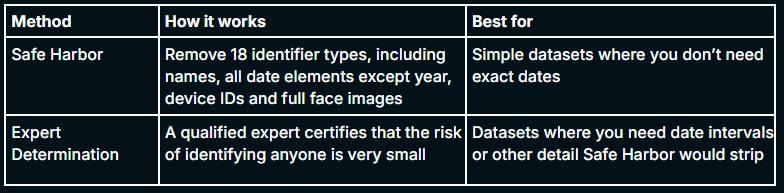
HIPAA gives you two ways to de–identify data. Both are valid, and data cleaned either way falls outside HIPAA.
Safe Harbor
Expert Determination
A qualified expert certifies that the risk of identifying anyone is very small
Datasets where you need date intervals or other detail Safe Harbor would strip
Imaging adds three traps that header tools miss:
- Burned in text: Use OCR based pixel redaction, then have people spot check samples.
- Faces in 3D scans: Head CT and MRI can rebuild a recognizable face, so apply defacing.
- Private tags and UIDs: Remove or remap them using the DICOM PS3.15 profiles.
Planning to shift dates instead of removing them? Safe Harbor won’t allow it. You’ll need Expert Determination.
BAAs and Data Residency
Every vendor that touches identifiable images needs a BAA before the first file moves. That includes your cloud host, your AI model provider, your support tools and your annotation vendor.
A strong BAA also spells out:
- Whether the vendor may train its models on your data. It should say no.
- How long the vendor keeps images, and how it proves deletion.
- Which subprocessors touch the data, each with its own BAA.
- How fast does the vendor report a breach to you.
Where you store data matters, too. HIPAA doesn’t ban offshore storage, but two states do.
- Texas: SB 1188 requires patient records to stay physically in the US for all records from January 1, 2026. That includes cloud regions and backups. The law doesn’t say if offshore teams can still view records remotely.
- Florida: Providers using certified EHR technology must keep patient data in the US or Canada, including data their cloud vendors hold.
Do you use an offshore annotation or engineering team? Settle these questions before you sign a Texas or Florida customer.
Our guide to AI BAA compliance covers the contract terms in more detail.
Breach Notification: HIPAA vs. State Deadlines
HIPAA gives you up to 60 days to notify affected patients. Many states give you far less, and their clocks run for their own residents.
State
Deadline to notify residents
Extra rule
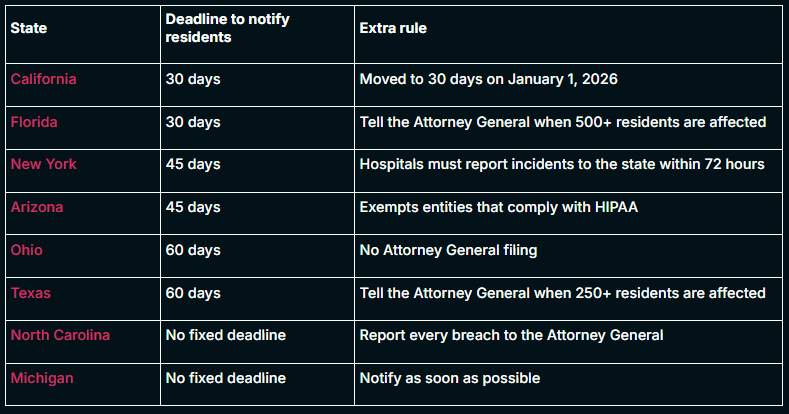
I think you should build your incident response plan around the 30-day clock. Then every state is covered. But that brings us to the next question every buyer asks. Can you actually prove your controls work?
Not sure your risk analysis would hold up if OCR asked for it? KLEAP maps every place your images live and tests your DICOM and PACS surface the way attackers do.
SOC 2 for Medical Imaging Startups
HIPAA tells you what to protect. SOC 2 gives buyers evidence that you protect it. It is specially crucial when you’re going to sell your solution to enterprise hospitals and healthcare orgs. For most imaging startups, a SOC 2 report is what moves a hospital deal past security review.
Why Hospitals Ask for SOC 2 When HIPAA Already Exists
HIPAA has no official certificate. Anyone can claim they follow it. A SOC 2 report gives buyers an independent auditor’s opinion on your controls.
Here’s what a hospital security team usually asks an imaging vendor for:
- A signed BAA.
- A SOC 2 Type II report, or a plan and date to get one.
- A completed questionnaire, often HECVAT or SIG.
- A recent pentest report that covers your DICOM and PACS surface.
- Your incident response plan and breach notice timelines.
SOC 2 Type I vs. Type II
Type I
Your controls are designed well at one point in time
Fast. Good for opening early hospital conversations
Type II
Your controls worked over an observation period
The window runs 3 to 12 months, and first audits often use about 6 months.
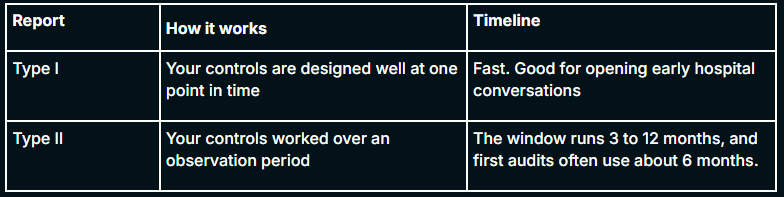
Most health systems want Type II. A Type I can buy you time while your Type II window runs.
Which Trust Services Criteria Should You Scope?
- Security: Required in every SOC 2.
- Confidentiality: Covers how you protect patient images and customer data.
- Availability: Matters if radiologists rely on your platform for live reads.
- Privacy: Worth adding if you run a patient facing viewer or portal.
Scope the systems that matter for imaging. Include DICOM routers, cloud PACS, model training pipelines and annotation vendors. A narrow scope that skips your AI pipeline won’t satisfy a careful buyer.
Build One Control Set for HIPAA and SOC 2
HIPAA and SOC 2 overlap heavily. Run them as one program, not two.
Control area
HIPAA asks for
SOC 2 adds
Risk assessment
A documented risk analysis of all ePHI
Proof you repeat and act on it
Vendors
A BAA with each vendor
A full vendor risk review.
Access
Access limited to job need
Evidence of regular access reviews
Logging
Audit logs of PHI access
Proof someone reviews and responds to alerts
Incident response
Breach notice within 60 days
A tested plan with defined roles
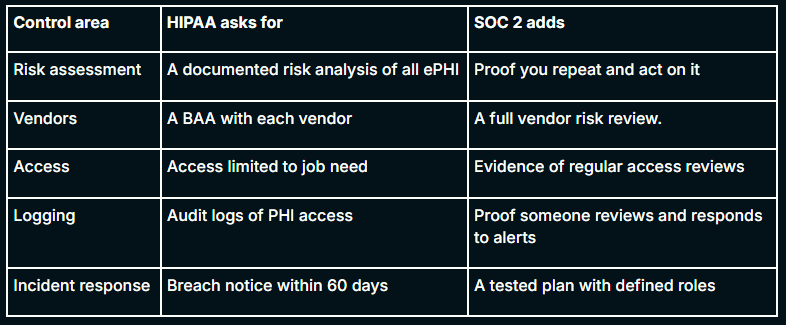
Build each control once, collect evidence once, and map it to both. That cuts cost and keeps your answers consistent across questionnaires.
Want to go deeper? Read our guides on SOC 2 vs. HIPAA.
HIPAA and SOC 2 cover your data and your controls. But, your AI models need their own rules.
AI Governance for Medical Imaging Startups
AI governance answers one question. Can you show how your model was built, tested, changed and explained to patients? For imaging AI, FDA, state lawmakers and hospital AI committees all expect a clear yes.
Imaging AI Is an FDA Medical Device
In January 2026, the FDA updated its clinical decision support guidance. Some software no longer falls under FDA oversight, but software that analyzes medical images still does. If your AI model analyzes medical images, you may need FDA clearance.
Cybersecurity is also part of the FDA submission process. Under Section 524B, the FDA can refuse submissions for connected medical devices that do not meet cybersecurity requirements.
The FDA’s latest cybersecurity guidance, explains what manufacturers need to submit. Reviewers look for:
- A software bill of materials (SBOM).
- A threat model and security risk assessment.
- Security testing evidence, including pentests.
- A plan for monitoring, patching and handling reported vulnerabilities after launch.
Hospitals are checking this too. A March 2026 Texas directive told healthcare facilities to align connected devices with FDA cybersecurity guidance. Read more on Texas medical device security.
Plan Model Updates Before You Ship
Imaging models improve with new data. FDA lets you describe planned changes in advance through a predetermined change control plan, or PCCP.
A good PCCP needs a controlled retraining pipeline. That pipeline handles PHI, so your HIPAA controls and your FDA controls meet here.
Govern Your Training Data
Your model is only as defensible as its data. Hospital AI committees will ask where every image came from.
- Record the source, date, and legal basis for each dataset.
- Keep proof of de-identification, or the BAA that allows you to use PHI.
- Ban vendors from training their own models on your data, in writing.
- Track which dataset version trained which model version.
- Test performance across patient groups, scanner makes and sites before release.
Tell Patients When AI Is Involved
States now require AI transparency in patient care. The duty usually sits with your hospital customer, but your product must make it easy.
- Texas: SB 1188 requires practitioners to review AI generated records and tell patients when AI supports diagnosis or treatment. TRAIGA, in effect since January 1, 2026, adds its own disclosure duty for AI used in care.
- California: AB 3030 requires providers to flag generative AI messages about clinical information and explain how to reach a human.
What this means for your product:
- Label AI outputs clearly in the viewer and in reports.
- Log which clinician reviewed and signed off on each AI finding.
- Offer a patient facing disclosure your customers can switch on.
Use a Framework to Structure Your Program
You don’t need to invent AI governance from scratch. Two frameworks give you a ready structure.
NIST AI Risk Management Framework
Free US framework built on four functions: Govern, Map, Measure, Manage
A strong starting point for any startup
ISO/IEC 42001
International standard for an AI management system, open to certification
When enterprise buyers want certified proof
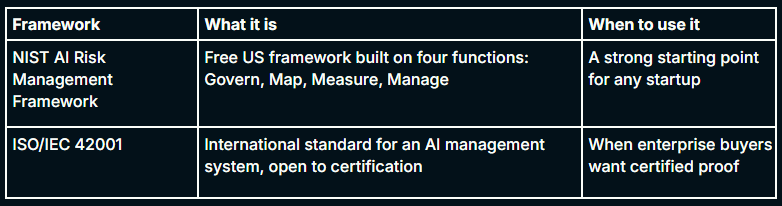
If you already have ISO 27001 or SOC 2 certification, you can build ISO/IEC 42001 on the same foundation.
Now you know what each framework asks for. Here’s how we help imaging startups put it all together.
How KLEAP Helps Medical Imaging Startups in Compliance
KLEAP help imaging startups build one compliance program that passes hospital security reviews and holds up if OCR comes calling. Every engagement is manual and evidence based. A dedicated expert learns your architecture, your data flows and the states you sell into.
- HIPAA risk analysis: A written assessment of every place patient data lives, from DICOM routers to training pipelines.
- PACS and DICOM Pentesting: We test your imaging stack the way attackers do, including exposed ports, spoofed AE Titles and crafted files. Explore our application security services.
- AI and LLM security testing: We test inference endpoints, model supply chains and data leakage paths. See our advanced threat and AI security services.
- SOC 2 and ISO readiness: We map one control set to HIPAA, SOC 2 and ISO 27001, and build the evidence buyers ask for. Explore our compliance and advisory services.
Building imaging software for US hospitals? Book a call. We’ll start with where your compliance stands today.
Frequently Asked Question
Are medical images like X-rays and MRIs considered PHI under HIPAA?
Yes. A DICOM file stores the patient’s name, birth date and accession number inside the image file itself. Some images also have patient details burned into the pixels. An image stays PHI until both the header and the pixels are cleaned.
Is DICOM HIPAA compliant?
No file format is HIPAA compliant on its own. DICOM is just a standard for storing and sharing images. Compliance depends on how you run the systems around it: encryption, access control, audit logs and de–identification.
Does a medical imaging software vendor need to sign a BAA? Does the treatment exception change that?
Yes. Any vendor that stores, processes or transmits identifiable images for a hospital or imaging center needs a BAA. The treatment exception lets providers share images with each other for patient care. It doesn’t cover a software vendor handling those images on a provider’s behalf.
How do you de-identify DICOM images for AI training? Is date shifting allowed under Safe Harbor?
Clean three layers: the header tags, any text burned into the pixels, and facial features in 3D head scans. Use the DICOM PS3.15 profiles for headers and OCR based redaction for pixels. Date shifting isn’t allowed under Safe Harbor, because it removes all date elements except the year. To keep shifted dates, use Expert Determination instead.
Can an imaging AI startup train models on hospital data without a BAA?
Only if the hospital de–identifies the data first, through Safe Harbor or Expert Determination. Once properly de–identified, the data falls outside HIPAA. If you receive identifiable images, you need a BAA that allows that use, and the training set stays PHI.
Do healthcare startups need SOC 2 or HIPAA first?
HIPAA comes first. It’s the law the moment you handle PHI. SOC 2 is voluntary, but most hospitals ask for it before they sign. The two overlap heavily, so build one control set and use it for both.
Is FDA clearance required for medical imaging AI software, and how does it relate to HIPAA?
Usually yes. FDA treats software that analyzes medical images as a medical device, and its January 2026 guidance update kept it that way. FDA reviews your model’s safety and cybersecurity. HIPAA governs the patient data you use to build and run it, so you need both.
Can medical imaging data be stored or accessed offshore?
HIPAA allows it, but two states don’t. Texas requires patient records to stay physically in the US from January 1, 2026, including cloud copies and backups. Florida requires providers using certified EHR technology to keep patient data in the US or Canada. Neither law clearly says whether offshore teams can view records remotely, so check before you staff annotation or support overseas.
Is the new HIPAA Security Rule in effect for imaging startups?
No. It’s still a proposal, and the final rule is now targeted for July 2027. The current Security Rule stays in force until then. If the new rule passes as written, MFA, encryption and yearly pentests become mandatory, and hospitals already ask for all three.
What happens if a PACS server is exposed to the internet?
Anyone who finds it can search patient lists and download full studies. Then OCR investigates. Vision Upright MRI’s exposed PACS server led to a breach of 21,778 patients‘ images. Northeast Radiology settled for $350,000 after a PACS breach that notified 298,532 patients. In both cases, OCR found the risk analysis was missing or inadequate.