

Your application passed its penetration test. That doesn’t mean it will still be secure next quarter.
Consider a healthcare SaaS company that fixes every critical vulnerability identified during testing. Three months later, a developer releases a new patient-records API without proper authorization checks. Any logged-in user can now access another patient’s records.
The earlier pentest didn’t catch this because the API didn’t exist when the test was performed. More importantly, the development process had no mandatory authorization checks before releasing new features.
An application security gap assessment helps uncover these missing controls and weaknesses in how security is maintained across releases.
This guide explains how to perform application security gap assessment in six steps, from reviewing existing controls to identifying risks and planning remediation.
What is Application Security Gap Assessment
An application security gap assessment checks your application against a security standard and shows where it falls short.
It asks a different question from a pentest. A pentest asks, “Can an attacker get in?” A gap assessment asks, “Why could they, and will it happen again?” To answer that, it reviews both the application and the practices that shape it like how your team designs features, reviews code, tests releases and grants access.
The baseline usually comes from a recognized standard, such as the OWASP Application Security Verification Standard (ASVS), plus any requirements your industry adds. For a healthtech product, that can mean HIPAA safeguards for patient data or the SOC 2 criteria your customers expect.
When Should You Perform an Application Security Gap Assessment?
Run one whenever your application or its risk changes:
- Before a SOC 2, ISO 27001 or HIPAA audit.
- After a major release, a new API or a new third-party integration.
- When you change how users log in or what they can access.
- When the same findings keep returning across pentests.
- Before an FDA premarket submission for medical device software.
Knowing when to run an assessment is half the answer. The six steps below show how to perform application security gap assessment.
How to Perform Application Security Gap Assessment: 6 Steps
To perform an application security gap assessment, you map what your application exposes, set the standard it should meet, test whether its controls actually work, and turn every gap into a fix with an owner. The six steps below follow that order. Each one ends with an output, and that output feeds the next step.
Step 1: Map Your Application’s Scope and Attack Surface
Don’t scope from your list of applications. Patient data also flows through APIs, admin tools, test environments and third-party services. Trace it from the moment a user enters it to every system that stores or receives it. That trace usually uncovers four things a standard scope miss:
- A legacy API version your mobile app no longer calls but your server still answers.
- An admin panel on a separate subdomain.
- A staging environment loaded with real patient records.
- Third-party connections, such as an EHR integration, a telehealth service or an analytics tool that collects page data.
If you miss an endpoint at this stage, the rest of the assessment never sees it.
Step 2: Set the Security Baseline Your Application Must Meet
Your baseline defines what “secure” means for this application. Build it in three layers.
- Application controls. Use OWASP ASVS, the industry checklist for application security. Level 2 suits most applications that handle sensitive data. Level 1 is too light for anything holding patient records.
- Development practices. Use OWASP SAMM or NIST SSDF (SP 800-218), frameworks for how teams build software securely, to judge how your team designs, reviews and releases code.
- Regulatory requirements. For healthtech, this means the HIPAA Security Rule. Limit who can access data, log who views it, prevent unauthorized changes, and encrypt it in transit. MedTech teams also need the FDA’s cyber device requirements under section 524B, including a software bill of materials (BOM) and a plan to monitor vulnerabilities after launch.
Turn each requirement into a checklist line with three parts, the control, where it applies, and the evidence that proves it works. Without the evidence column, the checklist becomes a policy document.
Step 3: Test How Your Controls Actually Operate
This step separates a gap assessment from a document review. A policy shows intent, and only evidence shows practice.
Take your secure code review policy as an example. On paper, every merge needs a second reviewer. In practice, branch protection might let admins bypass the rule, and three of your last ten merges may have skipped review entirely. The pull request history will show it.
Pull evidence for each control from the systems that run it:
- Pipeline configurations
- Pull request history
- Access logs
- Secrets management settings
- A sample of recent releases
Confirm that every security step ran every time, not just that it exists.
Weak company-wide control processes, such as developer offboarding, vendor reviews and change management, can also undo application fixes. Our Practical Guide to Security Gap Analysis in Compliance covers how to assess them.
Step 4: Identify the Gaps and Prove Their Impact
Compare what your application needs (your Step 2 checklist) with what you found working (your Step 3 results). Each gap falls into one of three types:
- Missing: The protection doesn’t exist. For example, nobody tests the API for access flaws.
- Partial: The protection covers only part of the application. For example, the website checks user permissions, but the API doesn’t.
- Inconsistent: The protection exists but doesn’t always run. For example, security scans get skipped when a release deadline is close.
Next, have a manual penetration testing to check your serious gaps. Take the patient-records API from the introduction. A scanner sees nothing wrong, because every request gets a normal response. A tester logs in as one patient, changes the patient ID in the request and gets another patient’s records. That turns a suspected gap into proven exposure, and proven exposure is what auditors and engineering leads act on.
Finally, rate each security area, such as access control, on a scale of 1 to 5. One gap is a single problem. A low score across a whole area means the same kind of problem will keep showing up.
Step 5: Prioritize Gaps by Business Risk
Rank each gap by how likely it is to be exploited and how much damage it would cause. Then move gaps up the list if they:
- Expose sensitive data: A gap that exposes patient records comes before one that exposes marketing content.
- Are reachable from the internet: A public-facing system comes before an internal tool.
- Will keep recurring: A broken process comes before a one-off bug, because a broken process creates new bugs with every release.
The recurrence factor changes most priority lists. A misconfigured server looks more urgent than a missing access check in your release pipeline. But fixing the server solves one problem. Without the access check, every new API your team ships can leak patient records the same way.
Add your compliance deadlines last. A gap that blocks a SOC 2 audit next quarter moves up the list.
Step 6: Build a Remediation Roadmap and Validate Every Fix
Give every gap two fixes, one for instance and one for the cause.
For the patient-records API, the instance fix adds authorization checks to that endpoint. The cause fix adds authorization test cases to your pipeline, so every new endpoint gets checked before release. Teams that apply only the first fix often see the same finding return in their next pentest.
Assign each fix an owner and a deadline. Then validate it with a retest that confirms the gap is closed, not just marked closed in a ticket. Re-score maturity at your next assessment to confirm the underlying practice has improved.
These six steps show how the assessment runs. But knowing how to perform application security gap assessment starts with knowing what it covers.
What Does the Application Security Gap Assessment Process Cover?
An application security gap assessment covers seven areas. Such as authentication, authorization, data protection, API security, secure development, third-party components, and logging.
Assessment area
What gets checked
Where the gap usually hides
Authentication
Login, MFA, password reset and session handling
MFA protects patient logins but not the admin panel or the support tool
Authorization
Role and record-level access across the application
The interface hides restricted data, but the server still returns it on request
Data protection
Encryption, data retention and where data ends up
The production database is encrypted, but patient data also sits in logs, backups and staging
API security
Endpoints, inputs and what each response returns
API responses send more fields than the app ever displays
Secure development
Code review, security testing and release gates
Security review becomes optional when a release deadline gets close
Third-party components
Libraries, SDKs and integrations
An analytics SDK receives patient data that no vendor agreement covers
Logging and monitoring
Audit trails, alerting and log retention
Logs show who signed in, but not whose records they opened
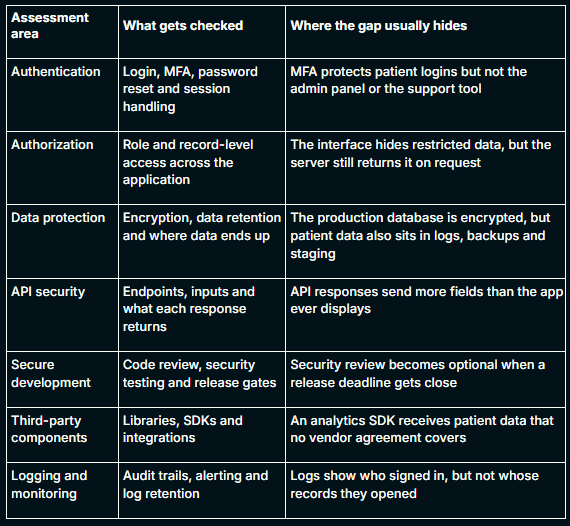
The last row matters most for healthtech. The HIPAA Security Rule requires audit controls, and a log that shows only logins can’t answer an investigator’s first question: who viewed this patient’s records?
Assessing these areas requires the right evidence. The next section covers the tools and techniques that collect it.
Tools and Techniques for Application Security Gap Assessments
No single tool shows you how to perform application security gap assessment end to end. Automated tools collect evidence quickly across your whole codebase. Manual techniques find the logic flaws and process gaps that tools can’t recognize. A strong assessment uses each one for the job it does best.
Technique
What it finds
What it misses
Static code scanning (SAST)
Insecure code patterns before release
Flaws that only appear while the application runs
Dynamic scanning (DAST)
Weaknesses in the running application
Endpoints it can’t discover, and access between different users
Dependency scanning (SCA)
Libraries with known vulnerabilities
What data your code sends to third-party SDKs
Manual code review and threat modeling
Design and logic flaws
Breadth; manual review is slow across large codebases
Manual penetration testing
Proven, exploitable impact
The process gap that let the flaw ship
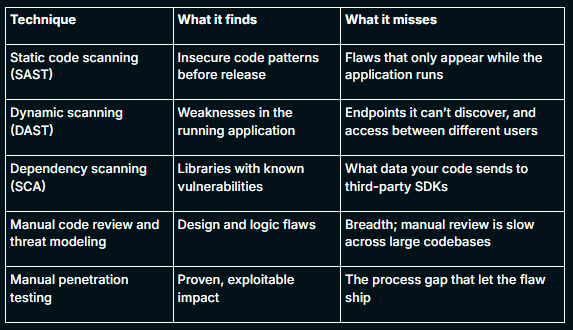
The patient-records API from Step 4 shows why manual work matters. Every scanner would pass it, because each request returns a valid response. Only a tester who switches patient IDs proves the exposure.
Where Application Security Posture Management Fits in a Gap Assessment
Application security posture management (ASPM) platforms pull scanner findings into one view, map each finding to an application and an owner, and track whether the numbers go down. That makes ASPM useful in Step 6 for tracking remediation and for spotting gaps that keep returning.
But ASPM only sees what your tools report. It can’t tell you that code review gets skipped near deadlines, or that an outside analytics tool built into your app receives patient data. Treat it as the tracking layer of your assessment, not a replacement for one.
Manual penetration testing appears in both halves of this section, which raises a fair question: if you already run pentests, do you need a gap assessment?
Yes, you still need a gap assessment. A pentest proves what an attacker can exploit today. but knowing how to perform application security gap assessment shows why the flaw shipped and whether your next release will repeat it. KLEAP can run both together, so every finding traces back to the process that allowed it.
Here’s what that looks like in practice:
- Manual testing that proves impact. Our testers validate findings by hand and show exactly what an attacker can reach. That’s how flaws like the patient-records API get caught when every scanner passes them.
- A checklist built for your standard. KLEAP builds each assessment from the framework you answer to, whether that’s HIPAA, SOC 2, ISO 27001 or FDA requirements for medical device software.
- Support beyond the report. We help your team put the fixes, policies and release checks in place, then retests to confirm they hold.
Book a call to find out which gaps your last pentest missed.
Frequently Asked Question
How do you perform an application security gap assessment?
To perform an application security gap assessment, follow six steps. Map every system your patient data touches, set a security baseline using OWASP ASVS and your regulatory requirements, test how your protections actually operate, identify and validate the gaps, rank them by business risk, and fix both each flaw and the process that let it ship.
What KPIs measure a successful application security gap assessment?
The best KPIs for an application security gap assessment show whether gaps close and stay closed. Track five of them: mean time to remediate high-risk gaps, the recurrence rate of closed findings, the percentage of releases that pass security checks before deployment, the change in maturity scores between assessments, and the percentage of fixes confirmed by a retest.
Which security frameworks and standards should an application security gap assessment use?
An application security gap assessment should use OWASP ASVS for application controls and OWASP SAMM or NIST SSDF (SP 800-218) for development practices. Healthtech and MedTech teams then add the requirements they answer to, such as the HIPAA Security Rule, SOC 2, ISO 27001 or FDA section 524B for medical device software. Choose standards based on your data and obligations.
What is the role of continuous security testing in an application security gap assessment?
Continuous security testing keeps the gaps an application security gap assessment closes from reopening between assessments. The assessment captures your security at one point in time. Security checks in your release pipeline and regular retests show whether those fixes still hold as your application changes. The assessment tells you what to test, and continuous testing confirms it stays fixed.
What is the difference between an application security gap assessment and penetration testing?
A penetration test shows which vulnerabilities an attacker can exploit in your application today. An application security gap assessment compares the controls your application should have against evidence of how they actually work, including your development practices. The pentest finds the flaw. The gap assessment explains why it shipped and stops it from recurring in future releases.
Is an application security gap assessment required for HIPAA or SOC 2?
Neither framework requires one by name. But HIPAA requires an accurate risk analysis covering electronic patient data, and SOC 2 auditors expect evidence that your controls actually operate. A gap assessment produces that evidence for your application.
What should an application security gap assessment checklist include?
An application security gap assessment checklist should include a data-flow map of every API and integration, a baseline built from OWASP ASVS and your regulatory requirements, and evidence collected from live systems. It should also cover gap classification, manual validation of high-risk gaps, risk-based prioritization, an instance fix and a cause fix for every gap, and retests that confirm each fix.
When should an application security gap assessment be performed?
Perform an application security gap assessment at least once a year and whenever your risk changes. Common triggers include a major release, a new API or third-party integration, changes to login or access rules, an upcoming SOC 2 or HIPAA audit, an FDA premarket submission, and the same findings returning across penetration tests.
What mistakes should you avoid in an application security gap assessment?
The most common application security gap assessment mistake is treating a passed penetration test as proof of security. Teams also trust policy documents without checking how controls actually run, leave third-party APIs and outside tools built into the app out of scope, and fix single flaws instead of the processes that let them ship. Scan-based reports that auditors reject cause the same problem at audit time.