
Healthcare averaged 102,209 malware hits per firewall in the first half of 2026. That’s about four times the next most targeted industry. For healthcare organizations, those numbers raise an important question: Are firewalls actually equipped to detect and stop these threats?
But a HIPAA compliant firewall isn’t a product you buy. It’s a firewall configured, monitored and tested to protect ePHI the way the Security Rule requires. If you manage firewalls for healthcare clients, that work sits with you. So does the question every client asks sooner or later: “Can you prove it?”
You confirm a HIPAA compliant firewall with five checks: map it to the Security Rule, assess its configuration, pentest it, validate its logging, and document the evidence.
Here’s our view from testing healthcare networks. A firewall is HIPAA compliant when testing proves it. Not when the vendor, the config file or your RMM dashboard says so.
Can a Firewall Be HIPAA Compliant Out of the Box?
No. HIPAA doesn’t certify firewalls, and no vendor can promise compliance out of the box.
Vendor HIPAA pages say their products “support” or “help you meet” HIPAA. For your managed clients, the work splits three ways:

Say an old vendor rule lets guest WiFi reach a client’s EHR server. The brand on the box won’t help anyone in that audit.
Top Firewalls for HIPAA Compliance: Which Should You Standardize On?
Many MSPs standardize on one or two firewall brands across clients. That makes setup, patching and monitoring easier.
Fortinet FortiGate, Palo Alto Networks, SonicWall, Sophos and WatchGuard all have the features HIPAA needs. Any of these HIPAA compliant firewalls can work. Any of them can also fail a review.
When you choose the best NGFW for HIPAA compliance across your client base, look at:
- Central management for many client sites
- Log export to your SIEM or SOC
- VPN with MFA and separate admin accounts per client
- How fast the vendor ships firmware fixes
Are You a Business Associate?
If you can access systems that hold or carry a client’s ePHI, you’re almost certainly a business associate. Managing a client’s firewall usually counts. Business associates are directly liable for the HIPAA Security Rule, including the risk analysis. So, you need a signed BAA with each healthcare client.
Expect clients to vet you the way they vet any vendor. Our list of 5 questions to ask before signing a healthcare BAA shows what they’ll likely ask.
HHS’s proposed update goes further. Business associates would have to verify their technical safeguards to clients at least once every 12 months.
So, what does that proof look like? Five checks you can run for every client.
How to Confirm a HIPAA Compliant Firewall: 5 Checks
Run these for each healthcare client. Together, they give your client proof an auditor will accept.
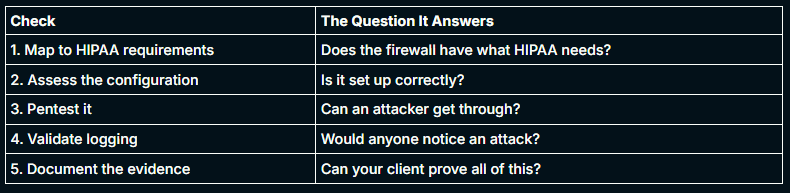
Check 1: Map Your Firewall to HIPAA Firewall Requirements
Match each HIPAA safeguard to a firewall feature. Confirm the feature is actually turned on. Flag anything that’s missing. Our practical guide to security gap analysis walks through the full method.
The Security Rule doesn’t name firewalls. But a firewall supports five of its safeguards. Keep one copy of this worksheet per client.
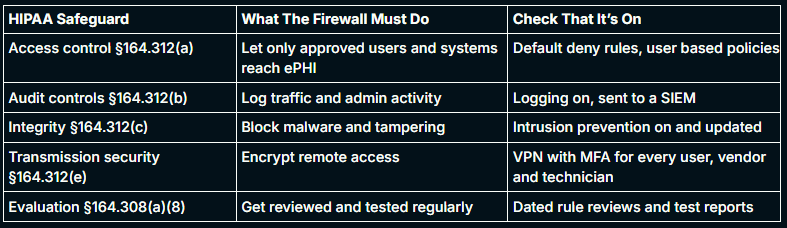
HIPAA Compliant Firewall Requirements Checklist
- Default deny rules, with a written reason for each rule
- MFA on all admin and VPN access, including your own technicians
- A HIPAA compliant VPN for staff, vendors and your team
- Intrusion prevention turned on
- HIPAA network segmentation between PHI systems, medical devices and guest WiFi.
- Match each HIPAA safeguard to a firewall feature. Confirm the feature is actually turned on. Flag anything that’s missing.
- Logs sent to a central system and reviewed.
Where These HIPAA Compliant Firewall Requirements Apply
A HIPAA compliant firewall protects five points in a client’s network. A gap at any one of them can expose patient data.
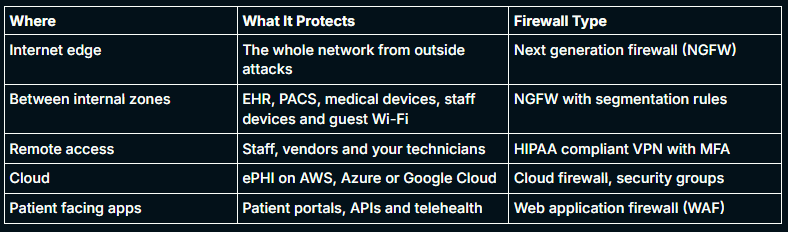
HIPAA Compliant Firewall Router for Small Practice Clients
Many of your smaller clients can run on an all in one business firewall router. It fits a single location with a small team and a cloud hosted EHR.
It still needs to:
- Export logs to your monitoring
- Run a VPN with MFA
- Keep guest WiFi on its own network (VLAN)
- Block intrusions and get firmware updates
A consumer router won’t do this job. Plan an upgrade when the client adds a second site, onsite servers, or connected medical devices.
WAF And Cloud Firewalls for Patient Portals and Telehealth
A network firewall doesn’t inspect traffic hitting a patient portal or telehealth app. A web application firewall (WAF) does. It blocks common web attacks before they reach the app.
For ePHI in AWS, Azure or Google Cloud, the provider’s firewalls and security groups do the job. The client signs the provider’s BAA. Then someone has to set the rules, and that’s often you.
Having the features turned on is a start. It doesn’t mean they’re set up right.
Check 2: Assess the Firewall Configuration
A configuration assessment reviews every rule and setting against CIS or NIST benchmarks. Each issue gets a score based on likelihood and impact. The result is simple: compliant or not compliant.
This check feeds your client’s HIPAA risk analysis. That’s the document OCR’s Risk Analysis Initiative keeps focusing on.
Review:
- Every rule, line by line
- Admin access, MFA and management ports
- Firmware and patch level
- Segmentation rules between zones
- The business reason behind each rule
HIPAA Firewall Rules That Fail Audits
Most failures come from setup, not hardware. These are the first things we look for:
- Any to any rules that let all traffic through
- Old rules left behind after a vendor install
- Management ports open to the internet
- VPN accounts without MFA, especially vendor accounts
- Rules nobody can explain
- No record of the last rule review
MSP Gaps Worth Checking First
Managing many clients creates its own risks. Look for these across your client base:
- The same admin password used on several client firewalls
- Remote management access left open to the internet
- Temporary rules from support tickets that never got removed
- Firmware updates applied at some sites but not others
- Shared technician accounts with no record of who changed what
HIPAA Network Segmentation: Is PHI Isolated?
Segmentation splits a network into zones. A breach in one zone can’t spread to the next.
Guest WiFi, staff devices, medical devices and PHI systems should each sit behind their own rules. A flat network lets an attacker walk from one to the other.
HHS proposed making segmentation a firm requirement in January 2025. But don’t wait for the final rule. A flat client network is a risk today, and fixing it later costs more.
In the cloud, review security groups and cloud firewall rules the same way.
A clean config file still doesn’t prove an attacker can’t get in. For that, you need a pentest.
Check 3: Pentest the Firewall to Prove It Holds
A manual pentest shows whether a firewall stops a real attacker. Testers try to break in the way a criminal would.
Each finding gets a CVSS score based on how easily it was exploited. That’s proof the controls work, which is what HIPAA’s evaluation safeguard asks for.
A firewall pentest covers:
- The external perimeter: open services, admin portals and firmware flaws
- VPN and remote access: logins, MFA, vendor access and technician access
- Segmentation: whether one zone can reach another
- Patient portals: whether attacks can get past the WAF
Why The Tester Shouldn't Be The One Who Set It Up
You built the firewall. You know every rule and why it’s there. That makes you the wrong person to prove it holds.
An independent tester sees the network the way an attacker does. They don’t share your assumptions. Your client gets evidence nobody can call biased.
It protects you too. If a client is ever breached, an independent report shows you did your job.
Why Healthcare Firewall Pentests Are Mostly External
Most healthcare clients won’t expose live patient data to internal testing. That’s a fair call.
So, most of our healthcare pentesting is external and black box. We start with no inside knowledge and attack like an outsider.
When internal testing is needed, we use a test bed or a tight scope with no real PHI. Products that haven’t launched yet get full testing before release.
Why you need both checks? The configuration assessment shows the firewall is set up to standard. That supports your client’s risk analysis. The pentest proves it holds under attack. That supports evaluation. Skip either one and an auditor will spot the gap. This is also the step a scanner can’t replace.
Need independent testing for a healthcare client?
KLEAP tests the firewalls you manage and gives your client evidence an auditor will accept.
Check 4: Validate Logging and Detection
Run simulated attacks. Then check that the firewall logged them and someone got an alert.
HIPAA’s audit controls safeguard expects your client to record and review activity on systems with ePHI. A firewall with logging off fails that test, even with perfect rules.
Confirm that:
- Logging is on for blocked traffic, PHI zone traffic, admin logins and VPN sessions
- Logs go to a central system, like your SIEM or SOC, so they survive an attack
- Alerts reach a person who acts on them
- Someone reviews the logs on a set schedule
This is where MSP setups often go wrong. You think the client reviews alerts. The client thinks you do. Put it in writing. Your service agreement or BAA should say who monitors, who responds and how fast.
Every check only counts if your client can show it.
Check 5: Document the Evidence Auditors Ask For
An evidence pack ties each finding to a HIPAA safeguard. It also shows what was fixed and when.
OCR judges compliance on the day of the breach. This pack is how your client proves it was compliant before anything happened. If HHS’s proposal becomes final, it’s also how you’d show your own safeguards each year.
The evidence pack should include:
- The configuration assessment report
- The pentest report, with proof for each finding
- Each finding mapped to a HIPAA safeguard
- Fix records and retest results
- Rule review and change history, including who made each change
- Your signed BAA with the client
How Often Should You Run A HIPAA Firewall Audit?
Run a firewall audit for each client at least once a year. Run one after any big network change, and with every risk analysis. Retest after fixes to confirm the gaps are closed. If HHS finalizes its proposal, clients would need scans every six months and a pentest every year.
Planning budgets for client testing? See what drives penetration testing cost for SMBs.
You might wonder if your vulnerability scanner could do all this faster. It can’t.
Why a Vulnerability Scan Can't Confirm a HIPAA Compliant Firewall
A vulnerability scan can’t confirm a HIPAA compliant firewall. It flags possible weak spots but doesn’t prove anyone can exploit them. It also can’t tell if the rules make sense. Your RMM or vulnerability tool probably scans client networks already. Those reports are useful for hygiene. They aren’t proof.
A Scan Shows What Might Be Wrong, Not What Is Wrong
Scanners match software versions against lists of known flaws. Their critical findings stay guesses until someone tests them.
One client came to us with a scan showing 10 critical findings. Our testers couldn’t exploit them, so we rated them low. Then we showed the client the difference, live.
A severity score with no proof isn’t compliance evidence. It can also leave your client chasing problems that aren’t real.
A Scan Can't Read Your HIPAA Firewall Rules
A scanner sees open ports from the outside. It can’t tell you that a rule from an old support ticket still lets guest WiFi reach an imaging server. It can’t tell you a rule has no business reason either. Only a configuration review catches that.
HHS treats scans and pentests as separate requirements
HHS’s proposed update would require vulnerability scans at least every six months. It would also require a pentest at least every 12 months, done by a qualified person. It’s still a proposal. But the message is clear. Regulators don’t see a scan as a pentest.
Auditors Push Back on Automated Reports
Auditors want proof of exploitation, impact and fixes. A scan export has none of that. We’ve seen clients’ tool generated reports rejected in regulatory review. They came back to us for a manual report built for the standard they were audited against.
Scan vs Configuration Assessment vs Pentest
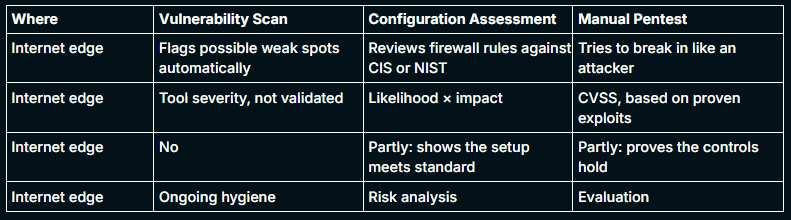
Keep your scans running. They catch new flaws fast between tests. They just can’t replace the five checks.
That’s where an independent testing partner comes in.
How KLEAP Confirms a HIPAA Compliant Firewall
KLEAP runs all five checks as one engagement. You get manual testing, a report built for HIPAA auditors and one lead who stays with you until every finding is fixed.
- Scoped to you: We build each engagement around your network, your PHI flows and your audit date.
- Manual testing: We exploit and show every finding. Our checklists go beyond standard frameworks.
- Reports auditors accept: Each finding maps to a HIPAA safeguard, with proof, impact and fix steps.
- One dedicated lead: You get regular updates, a full report walkthrough, fix guidance and a retest.
See what our report looks like, explore our HIPAA firewall and network testing.
Want proof your firewall is HIPAA compliant? Book a call about a scoped firewall assessment and manual pentest. You’ll get evidence your auditor will accept.
Frequently Asked Question
Does HIPAA require a firewall? Does it require a business-level firewall?
Is there such a thing as a HIPAA-certified or HIPAA-approved firewall?
No. HHS doesn’t certify or approve any firewall, and no vendor can guarantee HIPAA compliance out of the box. Vendors can only say their products support compliance. A firewall becomes HIPAA compliant through how it’s configured, monitored and tested, and through the evidence you keep.
Is it a HIPAA violation to disable a firewall?
Not automatically, because HIPAA doesn’t mandate firewalls by name. But disabling one removes a safeguard your risk analysis depends on. If that leaves ePHI exposed, or the change isn’t justified and documented, OCR can treat it as a failure to implement required security measures, especially after a breach.
Which firewalls are HIPAA compliant?
None are compliant by default. FortiGate, Palo Alto Networks, SonicWall, Sophos and WatchGuard all offer the features HIPAA needs. In the cloud, AWS, Azure and Google Cloud firewalls can support HIPAA once you sign the provider’s BAA and configure the firewalls correctly. In every case, setup and testing confirm compliance.
How long should firewall logs be kept for HIPAA?
HIPAA sets no specific retention period for firewall logs. It requires you to keep security documentation, such as policies, risk analyses and records of reviews, for six years. Base log retention on your risk analysis and policy, and keep the logs you rely on as audit evidence for as long as that documentation.